How to Export Your Transaction History from Saxo
Saxo keeps your purchases and sales in one report, the transaction overview (Transactieoverzicht). Finding it is the easy part. Getting it into a file the import can read is the harder part, because Saxo's help describes downloading it as Excel or PDF, and the import reads CSV.
This guide covers the overview from Saxo's Dutch platform, with Dutch column names. It explains where to find the report, what the CSV must contain, and what the import leaves out. Where we have not been able to confirm a step, it says so.
Which Saxo file do you need?
You need the transaction overview. Every row in it is one event on your account: a trade, a dividend, a deposit. A trade has the type Transactie, and Saxo writes the whole trade as one line of text in the Acties column:
Koop 1 @ 124.82 EUR
That is a purchase (Koop) of one share at 124.82 euros. A sale reads Verkoop. The date, the security's ISIN (the international code that identifies it on any exchange) and the transaction's own reference sit in columns of their own.
Saxo offers other reports that sound close:
- The positions overview lists what you hold today. It is not a transaction history, and the import has no dedicated reader for it.
- The dividend report lists dividends, not the purchases behind your shares.
- PDF statements are for reading, not importing.
Step 1: Open the transaction overview
Saxo's help gives two routes. Open Transactieoverzicht from the menu, or go to Portefeuille, then Transacties. Both lead to the same list.
Step 2: Choose the dates and the account
Set the start date before your first purchase. A report that starts later holds your recent sales and none of the purchases behind them. The file can import without a single error and still produce a cost basis that is wrong.
Then choose the account, or the currency account, the trades were made from. If you trade from more than one, export each and upload them one at a time. We import a file into the one portfolio you choose, so trades from two accounts in one file end up together.
Step 3: Keep the purchases and sales in it
Saxo lets you show all transactions or filter on one kind: orders (aan- en verkopen), corporate actions such as dividends, or money transfers. Choose Alle transacties. The import picks out the trades itself, and it tells you about corporate actions that changed a holding, which only works if they are in the file.
Saxo's help also says that details tonen adds every transaction detail, such as costs, to the export. Turning it on does no harm: the import reads only the columns it needs.
Step 4: Download it, and the CSV question
Saxo's help lists two formats for this export: Excel and PDF. If your screen also offers CSV, choose it. If it does not, this is where we have to be plain about what we know.
Our Saxo importer reads this report as a CSV, in the layout described below. What we have not confirmed is which Saxo control produces that CSV. Drop the Excel file on the import screen and it suggests saving the file as CSV from your spreadsheet app. That may work, but we have not tested it with Saxo's file, so we give no spreadsheet steps here. Renaming a workbook to .csv is not a conversion: the import refuses the file.
However you end up with a CSV, check it against the next section before you upload it.
Check you got the right file
Open the CSV in a preview, or in a text editor you close without saving. The first line is the column names. These five must be there:
| Column | What we read from it |
|---|---|
| Transactiedatum | The trade date, such as 02-Aug-2026 |
| Transactie-ID | Saxo's reference for the transaction |
| Transactietype | Whether the row is a trade |
| Acties | The direction, quantity, price and currency |
| Instrument ISIN | The code we match the security on |
Keep every other column as it is. Columns such as Klant-id are how we recognise a Saxo file, and Instrument gives the holding its name in our messages.
Two details are easy to lose in a spreadsheet:
- The dates. The column names are Dutch, but the month is written in English, as in 02-Aug-2026. A spreadsheet can rewrite that as 02-08-2026, and the import then rejects the row, saying that Saxo writes dates like 02-Aug-2026.
- The numbers in Acties. They use a full stop as the decimal point, as in 124.82.
If a column is missing, the import stops before booking anything, with a message such as: "Saxo parser: column 'Transactiedatum' not found. Please verify this is a Saxo transaction export." Go back to the report rather than renaming another column to match.
Step 5: Drop it into DividendAtlas
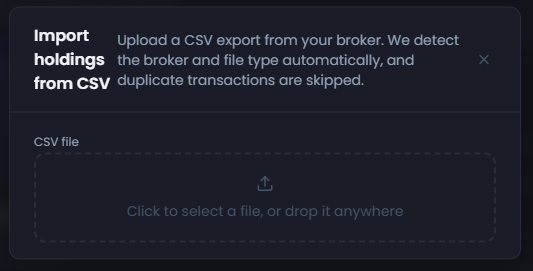
Open the import panel and drag the file onto it, or click to pick it from your downloads folder. We recognise a Saxo transaction overview from its columns, so with those intact there is no broker to choose and no columns to match.
A file that has lost too many of Saxo's columns falls back to the general CSV route, which asks you to match columns yourself. That route needs the quantity and the price in columns of their own, so it cannot read Saxo's trade line. Export the report again instead.
Saxo gives each transaction its own reference, the Transactie-ID, and a trade whose reference is already in this portfolio is skipped. A row with an empty Transactie-ID is matched on its details instead: the date, security, direction, quantity, price and currency. That cannot tell two identical orders from one order seen twice. So after an upload that overlaps an earlier one, check how many trades the result says it skipped as already imported.
What does the import bring in, and what does it leave out?
It brings in every row of type Transactie whose Acties line is a Koop or a Verkoop. Each becomes a purchase or a sale with its date, quantity, price and currency, matched to a security by its ISIN. A row can still be rejected, for example when its date cannot be read, or stay unmatched when we cannot place the security.
The price comes from Acties. The Boekingsbedrag column beside it is the cash Saxo booked, and that can include the costs of the trade, so dividing it by the quantity would overstate the price. Costs are not added to the price we book either, so a holding's cost here can differ from the cost Saxo shows for it.
Each holding the import matches then shows the dividend history and forward income we hold for it. It also shows its Dividend Health Score where we publish one, and some stocks have no score for reasons that post explains.
The import leaves out five kinds of row:
- Dividends. They are corporate actions in this report, and we skip them rather than record them as payments received.
- Reinvested dividends and other corporate actions. A Herbeleggingsdividend pays you in shares, and a split or a spin-off changes the shares you hold. We cannot book these yet, so the result names each one and says it "changes your holding in a way we cannot import yet".
- Deposits and withdrawals. They are money transfers, not trades.
- Trades without an ISIN. We do not guess the security from Saxo's own symbol. The row is rejected with: "This trade has no ISIN, so we cannot tell which holding it belongs to."
- Shares that arrived without a purchase, such as a transfer from another broker. Only Koop and Verkoop lines are booked from this file, so compare the share count of any holding you moved to Saxo with Saxo's own.
What if the result does not look right?
- The file is refused outright. It is still an Excel workbook or a PDF, whatever its name. The import needs a CSV.
- A column is reported missing. The file is a different report, or it lost its Dutch column names on the way. Export the transaction overview again.
- Dates cannot be read. Something rewrote them. Compare one with the 02-Aug-2026 form and go back to the file as it downloaded.
- Sales with no matching purchases. Usually the period started too late, so export again from before your first purchase. Shares that arrived by transfer or a corporate action can cause it too.
- A holding shows the wrong number of shares. Look in the import result for a corporate action on that holding, such as a reinvested dividend or a split. Check too whether some of the shares came in by transfer, which this file does not book. Then compare the quantity we show with Saxo's.
- Some rows were not imported. The import result says how many and why. Do not edit the file to swap in a security you guessed, because a wrong match is worse than a missing one.
Using other brokers too? Where to find your transaction history names the file to take from each broker we import. The guides for DeGiro, Trading 212, Interactive Brokers, Trade Republic, Lightyear, Revolut and Nordnet cover theirs step by step.
Frequently asked questions
- Can I upload the Excel file Saxo gives me?
- No. The import reads CSV files only, and renaming a workbook to .csv does not change what is inside it. Saxo's help describes downloading the transaction overview as Excel or PDF. We read the same report as a CSV, but we have not yet confirmed a tested route from Saxo's Excel file to that CSV.
- Does every Saxo report import?
- No. We read the transaction overview from Saxo's Dutch platform, with its Dutch column names. A Saxo report with English headings, the positions overview and the PDF statements are different files, and the import has no dedicated reader for them.
- How does Saxo write a trade in the file?
- As one line of text in the Acties column, such as Koop 1 @ 124.82 EUR, which is a purchase of one share at 124.82 euros. A sale starts with Verkoop. The date sits in Transactiedatum, written like 02-Aug-2026, and the security's code in Instrument ISIN.
- Will my Saxo dividend payments be recorded?
- Not today. The overview lists dividends as corporate actions, and we skip those rows rather than record them as payments received. Each matched holding still shows whatever dividend history and forward income we hold for that security.
- Can I upload two Saxo exports that overlap?
- Yes, into the same portfolio. Saxo gives each transaction its own Transactie-ID, and we skip a trade whose reference is already there. A row without one is matched on its details instead. Check the counts afterwards, and keep the files as they downloaded, because a changed reference is a new trade to us.
DividendAtlas provides data and research for informational purposes only. Nothing here is investment advice, tax advice or a recommendation to buy or sell any security. Always do your own research.